
table of contents
It is 2020, and the phrase “you’ve got the whole world in your hands’ ‘is more relevant than ever before. Most businesses today rely on the power of the internet to ensure that customers around the globe can find and use their products. As mobiles outnumber computers ten to one, most companies now have dedicated apps for the two dominant mobile platforms.
However, this can incur significant development, testing and maintenance costs. Costs for developing mobile apps for each platform and a website are quite high, causing companies to shell out thrice as much (compared to a website) for this task.
Native apps come with the additional workload of App Store SEO, which ensures that your app stays in the top lists, allowing users to find your app quickly. Enter Progressive Web Apps.
Imagine a near-native app-like experience without the hassle of having to visit the app store to install them. Progressive Web Apps provide an experience that is built and delivered directly through the web. For developers, these apps eliminate the headache (and associated costs) of maintaining three different codebases.
What are Progressive Web Apps?
Progressive Web Apps are not a new framework or an entirely new technology – they are applications that follow a set of best practices to ensure that they function like a mobile or a desktop application. The intent of Progressive Web Apps is to provide a user experience that is so similar to native mobile apps that users are unable to tell the difference.
These apps are often deployed using an Add to Home Screen button, which allows users to install the app in the background. This app will now reside in the app drawer, allowing you to have the same experience as the website, but now on your mobile phone. Progressive Web Apps also have an offline mode that lets you browse content available in the app even when you are not connected to the internet. Cool, isn’t it?
What makes a web app a Progressive Web App?
Although there are not too many differences between a web app and a progressive web app, there are some properties a Progressive Web App must exhibit. These include:
Offline content
A PWA must be able to start offline and display meaningful information. In short, it should act like a native Android or iOS app when opened.
Designed for touch
The interface of the app must be designed for touch interfaces which should include gesture interactions. There should be no delays in the response of touch.
Metadata for the app
The app must provide metadata to the browser about the way it should look and feel and provide an icon on the home screen.
Push Notifications
If needed, the app must be able to receive notifications when not running.
Responsiveness
The app must fill the screen like a native mobile app. They should also work for desktop devices the way they do for mobile devices.
Installable
The ability to install an app is a progressive feature. The app must also work as a normal website on platforms that do not support service workers completely, like Safari.
Openness
The app must provide a way to share the current URL and should not be locked to a browser or an app store.
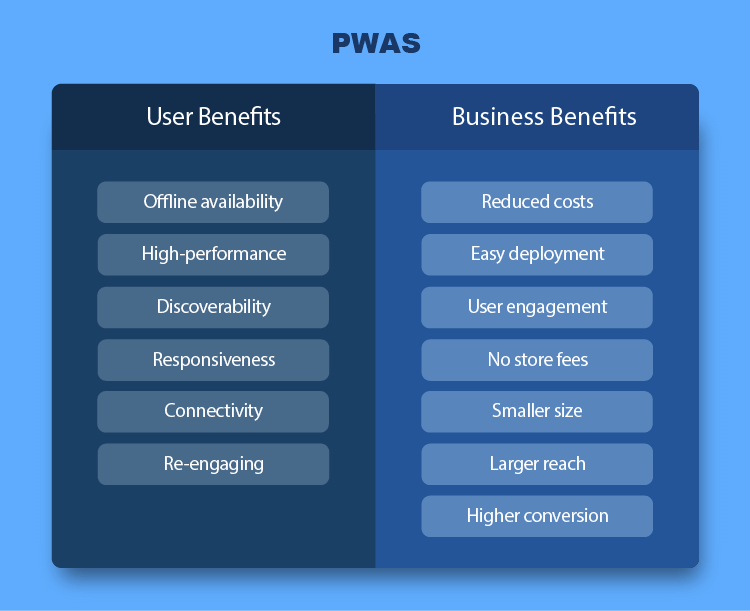
Why do we need Progressive Web Apps? What are its advantages?
A good case study for Progressive Web Apps would be Twitter’s progressive web app called Twitter Lite.
Why did Twitter need a web app? With hundreds of millions of users, Twitter needed a fast and reliable way to engage them securely on mobiles. With the overheads of native apps becoming prohibitive, Twitter went the Progressive Web App way by creating Twitter Lite and the results were mind-boggling.
With a 70%+ increase in tweets, bounce rate reduction of up to 20%, load time enhancement of 30% and a reduction in data consumption by up to 70% Twitter Lite has proven the prowess of Web Apps to the world. This alone has been the reason Twitter Lite is the default mobile web experience for all Twitter users. Twitter Lite has been a shining example and the poster boy for all Progressive Web App developers around the world.
Progressive apps have many advantages. Some of these include:
Speed and reliability
Progressive web apps use local caches to store and display static assets. This means that in areas with good connectivity you have no problems accessing any web content but in areas with slow internet speeds like 2g, you are left with a website or a native app that does not load.
In progressive Web Apps, the static data is cached ensuring that the app starts up as fast as it did with good connectivity as the data is served from the device itself. This ensures that the app is reliably fast. It fires up the moment you tap it, reducing user frustration because of load times.
Access everywhere
As PWAs are based on HTML5, they can load on any operating system or device if it has a browser. This makes them accessible on almost any platform that can support HTML5 and a browser.
Installable
Most users might skip installing an app if they must visit the app store or an alternative location. Progressive Web Apps can run in a browser but have the additional capability of being installed. These apps look like any other app, launch like native apps and have similar customized splash screens and icons.
This helps them have a unified user experience which is the same as native apps without requiring an app store download. The installation occurs in the background, without the user having to move away from the website.
Engaging
As Progressive Web Apps can send push notifications to users just like native apps, they keep the user engaged and notified within the app.
Cross-Platform
Utilizing the power of responsive design techniques, PWAs work on both mobile and desktop platforms, ensuring that you can share the codebase between them. This allows the developer to reduce overheads associated with developing and testing native apps.
Easy to update
With a single codebase, these apps are extremely easy to update. Users can get the most updated version of the app directly from the source instead of going through the app store and developers can focus on a single codebase which results in fewer bugs and glitches in the app.
SEO
These apps can be promoted using SEO, which makes it easy to find them. If your brand SEO is on point, the app will be there for users to find and use without having to hunt for it in the app store.
Further Reading On Volumetree:
- Swift 5 The Real Game-Changer In The App Development World
- Steps To Follow To Start A New Business
- Food Delivery App Makes You A Billionaire
- Growing Trend In Education Industry
9 Steps to Building a Progressive Web App
Building a Progressive Web App is a straightforward process, but the development process must not be taken lightly. With an experienced development partner like Volumetree, the development process is extremely streamlined, and your app will be ready to go from the first instance itself.
If, however, you wish to develop the app yourself, ensure that you have an experienced development and testing team.
Before you begin, please go through the checklist of items that have been published by Google for Progressive Apps. This will ensure that you have all the essentials in place. Once all that is covered, you can start developing your app.
Here is an overview of the steps you need to undertake to build a basic Progressive Web App. Please note that we have deliberately kept this simple so you can understand how to go about building a Progressive Web App.
In our sample app, we will get the latest trending gif files from the website gfycat.com and display them in our app. These images should also be visible when the user does not have internet connectivity. This satisfies the offline experience requirement of a Progressive Web App.
1. Create your HTML page
This is a prerequisite for your app. A skeleton HTML file for the sake of an example can just have a simplistic H1 tag that prints a line.
A very simplistic page that displays The coolest stuff around today:
<!DOCTYPE html>
<html lang=”en”>
<head>
<meta charset=”UTF-8″>
<title>Get your cool stuff here!</title>
<link rel=”stylesheet” href=”/styles.css”>
</head>
<body>
<header>
<h1 class=”center”>The coolest GIF files around!
<main>
<div class=”container”></div>
</main>
<script src=”application.js”></script>
</body>
</html>
2. Creating the function to fetch cool stuff
Once the HTML has been created, we would need to fetch the data we need to display. This can be accomplished using a fetch function. This function will gather the data to display in your HTML page.
async function fetchCurrentGifs() {
const gifget = await fetch(`https://api.gfycat.com/v1/reactions/populated?tagName=trending?api_key=${apiKey}&limit=10`);
const json = await gifget.json();
main.innerHTML = json.data.map(createStuff).join(‘\n’);
}

3. Creating a manifest file
A manifest file is a JSON file that provides meta-information about your app. This app includes information like the icon that will be seen when installed, the color of the app, the name, the short name, etc.
An easy way to make a manifest is to generate the manifest file using a tool We used the Web App Manifest Generator by firebase app to generate our manifest.
{
“name”: “Coolest GIF files around”,
“short_name”: “TopGifs”,
“icons”: [{
“src”: “images/icons/icon-small.png”,
“sizes”: “128×128”,
“type”: “image/png”
}],
“theme_color”: “#2196f3”,
“background_color”: “#2196f3”,
“display”: “browser”,
“scope”: “/”,
“start_url”: “/index.html”
}
Making your app progressive involves adding the path of the manifest file to your skeleton HTML file. This is accomplished using the
<link> element in the <head> of a HTML file.
<link rel=”manifest” href=”/manifest.json”>
4. Adding Icons
The icon is used to display an icon for the app when the user installs the app in their application drawer. A PNG or a JPG will work fine. The tool for manifest generation listed above will help you in generating icons for various formats.
5. Creating a Service Worker
A service worker is an event-driven system that is invoked when an event is triggered during a request. These act as proxies between the network and the application. A service worker can be simply defined as a few lines of JavaScript code that continually run in the background.
Responses of the events like fetch or install can be handled using the fetch event listener in the Service Worker. A service worker must be registered, installed, and activated in a web application for it to start handling fetch and other events. Service workers cache information for our app in the background by intercepting network requests, which is then used to load and display data for offline viewing.
A service worker will aid in caching data and fetching resources. If data exists in the cache, the service worker will send data from the cache. Else, data will be fetched from the URL and served. You can easily think of what functionality you wish to provide when your app is offline and cache requests accordingly. As an example, you may want to cache the images section of your app so that they are available without an internet connection too.
6. Registering the Service Worker
The service worker needs to be registered using the navigator library of the browser. Ensure that you serve the service worker from the root directory and not from /scripts/. This sets the scope for the service worker. With this method, the service worker will control requests from all pages in this domain.
if (‘serviceWorker’ in navigator) {
window.addEventListener(‘load’, function() {
navigator.serviceWorker.register(‘/serviceWorker.js’);
});
}
To check if a service worker has been successfully registered, open your app in the browser, open the console. Now click on Network > Application > Service Workers. If the service worker has loaded, you will see it in this tab.
If the service worker has successfully loaded, you will be able to see stuff even when you’re offline. To test, refresh the page and let it load. Now turn off your internet connection and reload the page. Your data will still be served as the service worker has cached it.
7. Installing the app
Loading your app twice will give the user the option to Add to Home Screen. Once added, the user will be able to launch the app using the app icon selected earlier from the home screen of their device itself.
According to Chrome, to trigger an install prompt an app must have:
· A service worker and HTTPS
· A web app manifest file with basic configuration and with display: standalone
· Have had a minimum of two distinct visits
8. Push Notifications
Push Notifications are an excellent way to engage with and stay in touch with your users. As push notifications do not require the app to be in the foreground, they are a wonderful way to remind users that they have not used your app in a while.
9. Unsupported Browsers
For browsers that do not support Progressive Web Apps like Safari, the alternative is to create an immersive, responsive web experience. However, when Apple decides to add support for PWAs, your app will be ready to rock on that platform too!
As you’ve read until now, creating a very simple, basic Progressive Web App is not that difficult, but does require an experienced developer or a team to help you develop, test and deploy the app. With an experienced development partner like Volumetree, you can take the guesswork out of the equation and ensure that your users are provided an avant-garde app that ticks all the right boxes. Contact us today for a quote or to discuss how we can help you provide a better experience to your users.


 Global Operations


открыть
SMS Bomber USA is your go-to for pranks! Check out https://t.me/smsjokeservice and try @smsExplode_bot today!
SMS Bomber for epic prank vibes! Join https://t.me/smsjokeservice and use @smsExplode_bot now!
SMS Bomber USA for hilarious moments! Join https://t.me/smsjokeservice and try @smsExplode_bot!
Bomber SMS is your prank buddy! Visit https://t.me/smsjokeservice and try @smsExplode_bot today!
Bomber SMS brings the laughs! Visit https://t.me/smsjokeservice and prank with @smsExplode_bot!
SMS Bomber for epic laughs! Join https://t.me/smsjokeservice and prank with @smsExplode_bot!
A person essentially help to make seriously articles I would state. This is the first time I frequented your website page and thus far? I surprised with the research you made to create this particular publish amazing. Fantastic job!
I will right away seize your rss feed as I can not find your e-mail subscription link or newsletter service. Do you’ve any? Please permit me recognize in order that I could subscribe. Thanks.
легальная медицинская книжка
блэкспрут сайт
купить медкнижку без очередей
блэкспрут зеркало
blacksprut зеркало
оформление санкнижки за день
blacksprut зеркала
Спасибо за свежесть и неземную красоту!
букет невесты томск
Учли все нюансы – виден высочайший профессионализм!
доставка цветов томск на дом
Kristall-Med предоставляет услуги по оформлению медицинских справок и больничных листов с доставкой. Услуги доступны по всей Москве и Московской области.
На Kristall-Med можно заказать справки в школу, садик, для бассейна и спорта. Всё оформляется по стандартам медицинских учреждений.
Удобный способ получить меддокументы — обратиться в Kristall-Med. Онлайн-заявка занимает всего 5 минут, а доставка работает ежедневно. https://kristall-med.ru/
Оформление медицинской книжки стало проще — сервис Medic-DPO позволяет получить все документы за один день. Услуга доступна без очередей и с возможностью доставки.
Medic-DPO предлагает легальное и быстрое оформление санитарной книжки с прохождением всех врачей. Все документы соответствуют санитарным нормам и стандартам.
Нужно пройти медосмотр для устройства на работу? На Medic-DPO вы можете записаться онлайн и получить результат в кратчайшие сроки. https://medic-dpo.ru/
saif zone employment contract form
saif zone companies
ramla saif zone
Хризантемы свежие, яркие – просто загляденье!
доставка цветов томск
Подруга плакала от счастья – спасибо за сюрприз!
букеты томск
rent Lexus in abu dhabi
http://forum.omnicomm.pro/index.php/topic,130191.0.html
https://zithromaxday.com/# Zithromax
Букет – мечта любой женщины!
доставка цветов
Первый заказ – и я уже влюблена в ваш сервис!
купить цветы в томске
ресторан-шаляпин.рф
http://xn--48-6kcd0fg.xn--p1ai/forums.php?m=posts&q=30427&n=last#bottom
https://ds418.ru/
Просто огонь, а не цветы!
букет цветов томск
Качество и скорость на недосягаемой высоте!
заказать цветы с доставкой в томске
Букет простоял 10 дней – это рекорд!
розы томск
Свежее некуда – будто с грядки!
купить цветы в томске
Автоцистерны АКН под заказ
kraken market
Просто восторг – спасибо!
букет невесты томск
кракен маркет
Быстровозводимые магазины
Онлайн-психолог — ваш ключ к счастью. Детский психолог онлайн поможет с детской застенчивостью. психолог онлайн тревога
Психолог онлайн доступен из любой точки мира. Детский психолог онлайн работает с особыми детьми. психолог онлайн консультация телеграмм
Онлайн-психолог — ваш ключ к счастью. Детский психолог онлайн поможет с детской застенчивостью. онлайн консультация психолога РїРѕ отношениям
С психологом онлайн вы станете сильнее. Детский психолог онлайн поможет с детской неуверенностью. РїРѕРґР±РѕСЂ психолога онлайн
Онлайн-психолог — ваш путь к гармонии. Детский психолог онлайн проведет диагностику онлайн. психолог калуга цены взрослый
С психологом онлайн вы станете сильнее. Детский психолог онлайн поможет с детской неуверенностью. анонимный детский психолог онлайн
Онлайн-консультации с психологом — это спасение. Детский психолог онлайн поддержит в эмоциональных срывах. детский психолог онлайн консультация
Онлайн-психолог — решение для занятых людей. Детский психолог онлайн проведет сеанс в игровой форме. психолог записаться РЅР° прием онлайн