

table of contents
Infrastructure costs for the information technology domain have always been on the rise. Companies needed to invest heavily in data centers and servers to ensure that their applications were able to run without problems. The advent of cloud computing completely revolutionized the market by offering a pay-as-you-go option instead of physical hardware purchases.
This approach significantly reduced the cost per GB for small companies that wish to use a highly efficient platform for their computing and data storage needs. Platforms like Microsoft Azure, Google Cloud, and Amazon Web Services and many others have launched their solutions that can help smaller companies move their computing needs online with the promise of significant cost savings in upfront investment with the benefit of being able to scale on demand.
One of the most used platforms in this domain is AWS. With a substantial list of offerings and an equally diverse set of packages, AWS is arguably the most popular choice of developers and companies around the world. These costs, however, can sometimes escalate if the services are not used judicially. Having an experienced partner like Volumetree can help you ensure that your bills do not spiral out of control while still helping you be on top of your application game.
If you are using AWS and think that it is breaking the bank, read on.
Building applications on AWS is a great choice, however, developers must ensure that they consider the economic aspect of their architecture and use the AWS services judiciously and effectively to both your computational and financial advantage.
Here are some ways you can reduce the cost of your AWS bill
1. Stay in command: Track and analyze your service usage
Using monitoring and management tools can help you check your instance metrics. Leveraging the data that you collect from these metrics; you can check your workload and scale your AWS instance size accordingly.
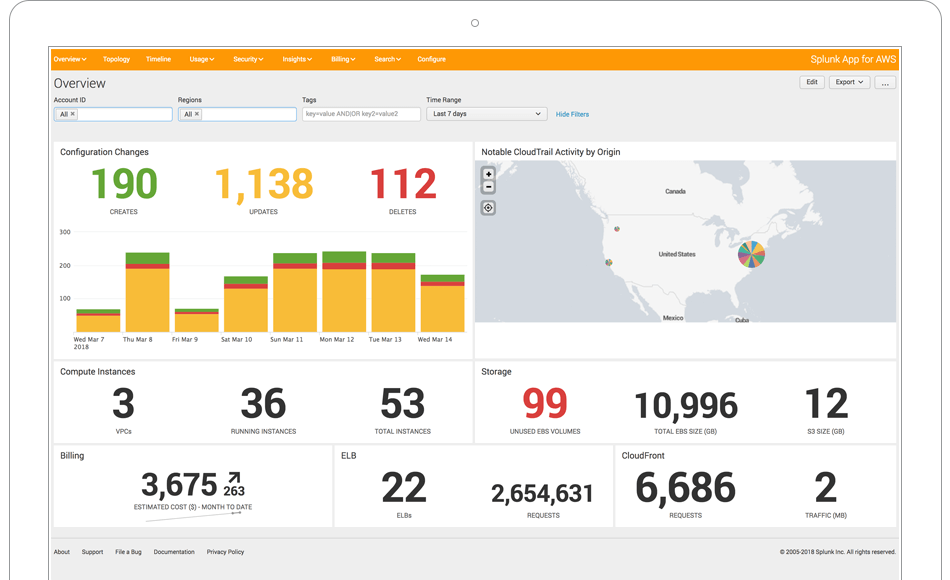
Tools like Amazon Cloudwatch can help you set alarms, check and verify log files and use automation to react to resource changes that may be wasteful. You can also check your own application’s metrics using APIs that send and store data that you may use to analyze inefficiencies in workloads.
You can also use tools like TrustedAdvisor. This tool helps you run configuration checks and find and report idle resources. With real-time assistance in helping you provision your resources according to best practices and updates to helping you reduce costs; this tool is a great resource for you if you are using AWS.
2. Got multiple accounts? Use one bill with consolidated billing
At no additional charge, AWS will let you use its consolidated billing service to see a single-window view of all the charges incurred across all your accounts. You can do this by setting up one account as a master account. This account will be used to pay for all of the other accounts in the “family”. The charges levied to each account can easily be tracked and downloaded into a CSV file that can be used to monitor and analyze changes in a spreadsheet.
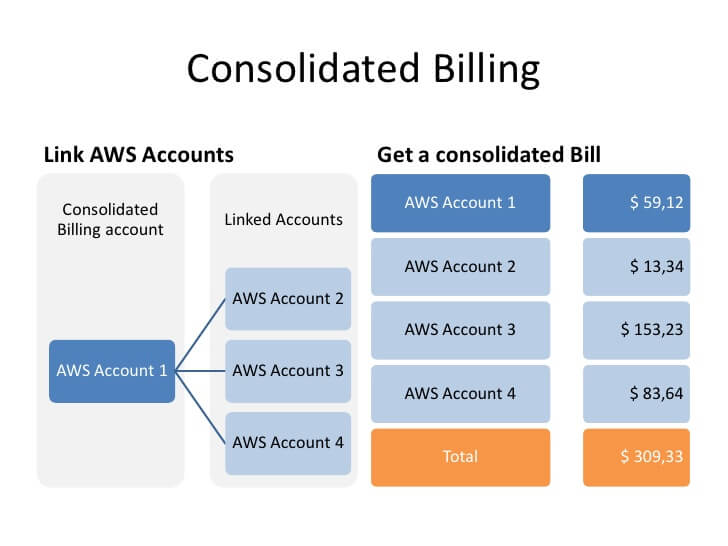
Let us use an example that uses 2 accounts, A and B to put this into perspective:
Account A is the master account.
Usage:
Account A: 8TB
Account B: 4TB
Cost brackets:
Initial 10Tb: $0.19/Gb:
Next 2TB: $0.15/GB:
Using Individual account billing:
In this case, EACH account will be billed for the first 10TB of data making the total to be
8TB@$0.19/GB=$1556
4TB@$0.19/GB=$778
Total = $2334
Using Consolidation:
In this case, the master account is billed for a total of 12TB, in which the first 10TB will be billed at $0.19/GB and the subsequent 2TB will be billed at $0.15/GB. This will amount to $1945+$307 = $2252
10TB@$0.19/GB=$1945
2TB@$0.15/GB=$307
Total = $2252
As illustrated with the example, the total is much lower in the case of consolidated billings.
As your usage increases, your multiple billing amounts will see substantial savings as you move data usage across tiers into one consolidated account.
3. Efficiency is the key: Turn off unused resources

Developers often ignore their development environments and let resources stay in use at the end of the day. Turning off these resources after work hours and on weekends can significantly reduce your bills. Amazons rapid deployment and redeployment services like AWS OpWorks and Elastic Beanstalk can help you get up and running consistently, without bothering about the underlying infra configuration.
Creating a resource template of your AWS resources using AWS CloudFormation is another way to utilize the concept of ephemeral workloads, which allows developers to turn off or delete resources that are not in use without concerns. AWS CloudFormation lets you define your infrastructure as code, helping developers quickly create templates of your AWS Resources.
4. Using spot or reserved instances instead of on-demand instances
Spot instances can help you save up to 90% of your costs! If your workloads are fault-tolerant and flexible, Spot instances can help you with massive savings. You can bid for instances that are not in use for times when you need a lot of compute capacity without the downside of getting terminated with as little as a 2-minute notice.
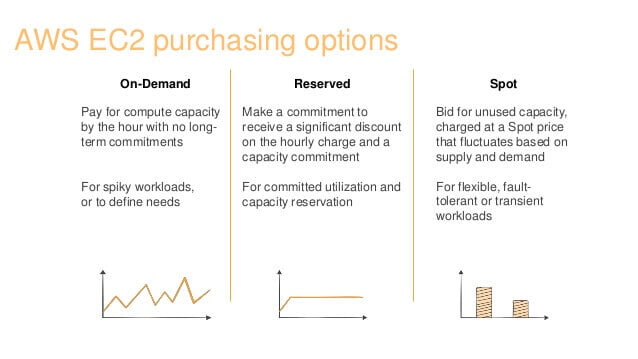
Reserved instances can give you unprecedented savings, and in some cases cost you as low as 25% of what an on-demand instance may cost. A reserved instance is an annual (1 or 3 year) commitment to reserve capacity in return for a lower rate per hour. The good thing about Reserved instances is that you can sell them off on the RI marketplace if you do not need it. Payments can be made either in one go with Full Upfront or in monthly installments of the balance using Partial Upfront or No Upfront.
Reserved instances are not the only service in which you can use the benefits of lowered costs. The following services will also let you take the same advantage of cost over space:
- Amazon Dynamo DB
- Amazon RDS
- ElastiCache
- Redshift
5. Choosing the right storage class – the benefit of cost over data availability
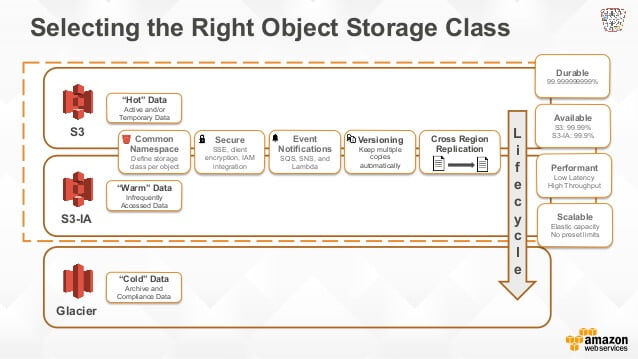
Amazon S3 provides you 5 different tiers for object storage. These include:
- Amazon S3 Standard: This is the preferred class for general usage and frequently accessed data. Smaller companies with low usage can benefit from the Amazon Free tier. The Free Tier benefits include:
- 5gb of S3 storage
- 15GB data transfer
- 20,000 GET requests
- 2,000 PUT requests
Note: the FREE tier for Amazon S3 is free for 12 months.
- Amazon S3 Standard – Inferior Access: This tier can be used for data that is not as frequently used or required as the data in the Standard instance. This tier is cheaper than the Standard S3 tier but adds a $0.01/GB data retrieval fee.
- Amazon S3 One Zone-Infrequent Access: This tier is best used as a secondary backup. Data is not as resilient as the IA tier and is stored in a single availability zone.
- Amazon Glacier: The best for data archival or backups, bulk retrieval time for data can be between 5-10 hours and at an additional cost, data can be retrieved relatively quickly (1-10 minutes).
Using each class appropriately can help you optimize your costs and reduce extra expenditure. Cost for each tier is broken down into the following parameters:
- Number of HTTP GET requests
- Number of HTTP PUT requests
- Data Transfer volume
It is best to implement an automatic methodology that manages your object lifecycle. As an example:
- Deleting specific objects after a set period from the archive
- Archiving data from Infrequent access to Glacier after a set period
- Moving data to from standard the infrequent-access storage class after a set period
This allows you to keep the data that you require immediately in the most expensive tier, data that you use infrequently into the middle tier and even more infrequently used data to the archive tier, from where it can be deleted. A combination of these tiers can help you reduce costs substantially.
6. Auto Scaling – Your friend in need
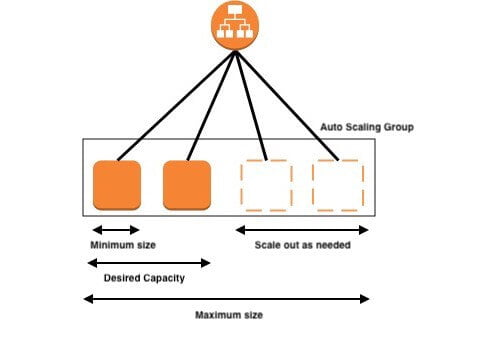
This feature showcases the versatility of cloud computing in its entirety. Auto Scaling helps companies plan for exigencies, creating launch configurations, maximum/minimum size definitions and policies that are triggered in the case of need and then turned off. Auto Scaling is simple to set up and even simpler in practice for smaller companies, helping you scale during periods of increased demand and downsize when demand wanes.
Autoscaling also provides developers with an additional benefit: If an instance is unhealthy, you can terminate that particular instance and launch a new version automatically.
Although cloud computing has made things easy for everyone and helped companies scale in times of need, it comes with the additional workload of planning well to ensure that your easy transition does not convert into an expensive proposition. A little time and effort put into actually planning your AWS migration can go a long way in ensuring cost savings, reduced administrative workload, and better application performance. An experienced partner like Volumetree can help you take the AWS plunge with ease. Contact our AWS experts today.


 Global Operations


micronase 5mg for sale – order actos purchase forxiga online
buy repaglinide 2mg generic – how to get empagliflozin without a prescription order jardiance 10mg without prescription
semaglutide 14 mg cost – buy glucovance for sale DDAVP price
lamisil tablet – grifulvin v medication griseofulvin online buy
reputable indian pharmacies http://indiaph24.store/# indian pharmacy paypal
indian pharmacy online
purchase nizoral online – purchase butenafine sporanox 100 mg pill
order famciclovir 500mg generic – cost acyclovir valcivir 1000mg pills
http://canadaph24.pro/# onlinepharmaciescanada com
mexican mail order pharmacies: Mexican Pharmacy Online – mexican pharmacy
Online medicine home delivery http://indiaph24.store/# buy medicines online in india
pharmacy website india
best canadian online pharmacy [url=http://canadaph24.pro/#]Certified Canadian Pharmacies[/url] rate canadian pharmacies
http://canadaph24.pro/# canadian pharmacy ed medications
https://canadaph24.pro/# buy prescription drugs from canada cheap
cytotec pills buy online: order cytotec online – buy cytotec pills online cheap
http://nolvadex.life/# where can i buy nolvadex
https://ciprofloxacin.tech/# cipro pharmacy
does tamoxifen cause menopause [url=http://nolvadex.life/#]what happens when you stop taking tamoxifen[/url] tamoxifen cost
http://nolvadex.life/# tamoxifen menopause
buy cytotec online fast delivery [url=http://cytotec.club/#]Cytotec 200mcg price[/url] buy misoprostol over the counter
lisinopril 25 mg price: prinivil 10 mg tab – lisinopril 5mg prices
http://lisinopril.network/# lisinopril 420
lisinopril capsule [url=https://lisinopril.network/#]lisinopril online without a prescription[/url] lisinopril 40 mg generic
should i take tamoxifen [url=http://nolvadex.life/#]nolvadex side effects[/url] arimidex vs tamoxifen bodybuilding
http://cytotec.club/# Cytotec 200mcg price
purchase cipro [url=https://ciprofloxacin.tech/#]ciprofloxacin order online[/url] ciprofloxacin 500mg buy online
purchase cytotec: purchase cytotec – order cytotec online
https://cytotec.club/# buy cytotec over the counter
purchase lanoxin online – order furosemide 100mg pill buy lasix 100mg generic
https://cytotec.club/# buy cytotec
cost generic propecia [url=https://finasteride.store/#]generic propecia without a prescription[/url] order propecia pills
buying propecia without prescription: propecia generic – cheap propecia
cost propecia [url=http://finasteride.store/#]cost generic propecia pill[/url] buying generic propecia without rx
http://nolvadex.life/# tamoxifen rash
cipro [url=http://ciprofloxacin.tech/#]buy cipro online[/url] ciprofloxacin 500 mg tablet price
https://ciprofloxacin.tech/# cipro pharmacy
tamoxifen reviews: does tamoxifen make you tired – where to get nolvadex
tamoxifen and depression [url=https://nolvadex.life/#]tamoxifen for gynecomastia reviews[/url] where can i buy nolvadex
http://nolvadex.life/# alternatives to tamoxifen
https://finasteride.store/# get propecia without a prescription
buying generic propecia: order propecia – propecia order
metoprolol over the counter – telmisartan price order nifedipine generic
http://nolvadex.life/# aromatase inhibitor tamoxifen
ciprofloxacin: cipro ciprofloxacin – buy ciprofloxacin over the counter
lisinopril 20mg prices [url=https://lisinopril.network/#]lisinopril 10 india[/url] zestril 10 mg cost
http://cytotec.club/# order cytotec online
nolvadex pills [url=http://nolvadex.life/#]tamoxifen reviews[/url] tamoxifen cost
buy generic propecia [url=http://finasteride.store/#]buying generic propecia online[/url] order cheap propecia prices
https://cytotec.club/# purchase cytotec
https://nolvadex.life/# clomid nolvadex
tamoxifen alternatives premenopausal: tamoxifen for gynecomastia reviews – tamoxifen bone density
Cytotec 200mcg price [url=https://cytotec.club/#]buy cytotec over the counter[/url] buy cytotec over the counter
http://finasteride.store/# get propecia without insurance
lisinopril generic cost: lisinopril tabs 20mg – where can i order lisinopril online
microzide 25mg canada – zestril generic buy zebeta pills for sale